
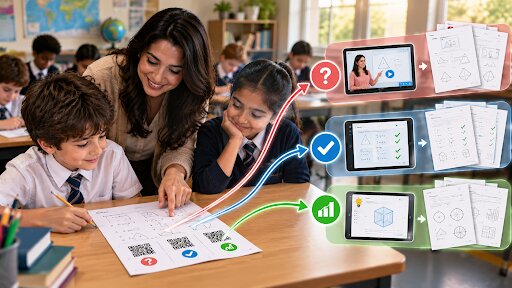
Thirty children. One worksheet. There were nine different levels of readiness in the room.
This is the problem every teacher knows, with the same rotten choices facing all teachers: teach to the middle and leave everyone disappointed at both ends, or plan an evening on Sunday writing four sets of everything. Neither works for a full timetable, and the Sunday evening one is how people leave the profession.
The third is free of charge.
The differentiated worksheet, done cheaply
Print one worksheet. Add 3 wonton codes in one corner, simply labelled: “stuck”,”check your answer”, & “go further”.
The first links to a two-minute explainer video (or worked example). The second of the answer key, that sounds reckless and for the most part is not because a child who checks after attempting has learnt something and a child who copies was never going to attempt anyway. And the third links to a more challenging extension activity for anyone who finished in eleven minutes and is now doodling at their desks.
One printed page. Three routes through it. No Sunday evening.
Those who require support are able to get it without the pressure of raising their hand in front of the class, which is often the real barrier for so many. That aspect is more important than the saving on time.
Where else it works
Homework that explains itself. We put a code on the sheet that goes to the Lesson recap. The biggest cause of homework problems is a parent (the one who actually does the homework with their child) who was taught long division differently and has held everybody up at the kitchen table for an hour now, and this is really aimed at parents, not kids.
Library and reading corners. Codes on shelf labels or inside covers that will take you to a brief book trailer, or a recorded pupil review from the previous term. When it comes to getting kids—and even reluctant ones— excited about reading you get many more hits when you have another child recommend a book than an adult.
Classroom displays. Pupil work on the wall with a code which you can scan to hear the child speak about their project in their own voice. Evening with the parents transcends a laminate poster.
Science and practical lessons. A code from the equipment to link back to a safety demo, so that the method is local and not remembered from ten minutes ago.
Absent pupils. An indication of the term lesson materials at the top corner of the exercise book A child coming back after a week — has an in road back in without the teacher having to verbally reconstruct that week.
Trips and outdoor learning. A trail is turning a field into codes on laminated cards around the school grounds. Half the point is that the move rather than walk they produce.
One at a time, straight up
The technical part is done in less than a minute and does not require the IT coordinator.
Store whatever it is you are linking to in a place with a consistent web address. But a video on the school channel, a file in read-only mode in drive, a page into the website. Copy that address. Generate a QR code from it, download the resulting image and then paste into your worksheet like any normal picture.
Print. Done.
The key point however is getting your permissions correct. Worse even than not providing a code at all, is giving them a code to a document that requires logging in — Thirty kids hit an access request screen all at once and you are swamped with IT support queries instead of teaching all lesson long. From a device not logged on to your school account, check each link. A personal phone + incognito mode does the trick.
On a specific level, test it not on your business phone but from your individual phone. Not the staff laptop.
The bits schools get wrong
Codes printed too small. Anything smaller than about two centimetres becomes unreliable, and unreliable means potentially a line of children at your desk in a classroom variable lighting (sorry if I just made you very anxious).
No label. A naked black square does not give a child any information as to whether it is worth scanning or not. Well, nine words beneath solves it entirely.
Photocopying. This is the sneaky one. … Code that looked sharp on the original fades through two generations of copying, and by the third copy all detail is lost. Always print from the digital file, never make a photocopy, but if you must copy then print the code slightly larger than you think it should be.
Links that die. An erroneously moved video in August breaks every worksheet in the filing cabinet. Either keep the destinations as they are or point them to pages on the school site that could be diverted later.
The device question
Several schools shouldn’t even have them out, as not every child has a phone. Fair.
This is done with a common set of tablets, with children rotating through just a few devices at each station or on classroom computers where the child types in a short link printed next to the code as backup. The one best accommodation is simple: Print the code and a short readable URL, because that is an accommodation which removes device dependency but not the benefit.
The phone involved is usually that of a parent, and that is ok for homework. At least half these uses are intended for that audience anyway.
Worth trying once
Take next week’s worksheet. One “stuck?” code with linking to one explainer video..
Fifteen minutes, including locating the video to run. Grab a random free qr code maker, put the image in corner of the page, and see how many children actually use the qr code during a lesson.
You wasted 15 minutes for no one to scan it. If eight kids can use it instead of lining up at your desk, you have quite literally just reclaimed forty minutes of your lesson.
More often than the first, the second thing happens.
FAQ
Do you need an app to scan QR codes in the classroom? No. You directly read codes with the built-in camera in modern phones and tablets. Free scanner app installed once on older school tablets
What If a Few Kids Have No Device? Make a short readable web address next to the code as a fallback, use common tablets or a rotation station instead of users’ personal phones for access.
Do photocopied QR codes scan? Once, sometimes twice, almost never more. Print from the digital file where possible and enlarge the code generously, as copy quality deteriorates the fine pattern.
Are you allowed to link out to a google doc or drive file? Definitely, but first share set to anyone with the link can view. It is worse than not having a code at all, if it leads you to any kind of access request screen.
My class QR code could fit in the palm of your hand. On worksheets, have it at two centimetres square or bigger. Classroom lighting and worn cameras in older devices are more than the desk test portends.